
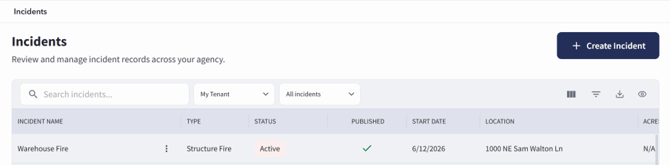
The Incidents screen can be accessed by selecting Incidents from the sidebar. It can also be accessed by selecting Entities, then choosing Incidents.
Upon opening, users are presented with a list of Active Incidents by default. This list can be filtered to display:
- Active Incidents
- Scheduled Incidents
- Closed Incidents
- All Incidents
The displayed list will update based on the selected filter.
The Incidents screen displays incident records in a table. Users can search incidents using the search bar and filter the list using the available tenant and incident status filters, such as My Tenant and All incidents. Additional table controls allow users to adjust visible columns, apply filters, export data, and change the table view. A Waiting for approval filter is also available from the table view controls.
Selecting an incident name will open the detailed view for that specific incident.
Users can create a new incident manually by selecting + Create Incident in the top-right corner of the Incidents screen.