
The Agencies section allows authorized users to view and manage agencies available within the platform.
This section is primarily intended for system administrators or users with agency management permissions. Access to this section and the available actions may vary depending on user role, permissions, and agency configuration.
Agencies represent organizations or departments that may be involved in incidents, response activity, configuration, or operational coordination. This may include agencies within a single jurisdiction, such as Police, Fire, and Public Works, as well as outside agencies that may participate in mutual aid or regional coordination.
Agency information can support incident association, jurisdictional awareness, and coordination across multiple organizations.
Main Agencies Screen
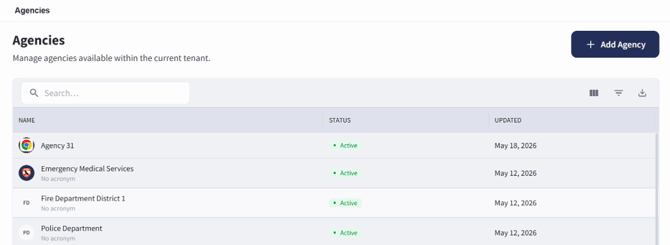
The Agencies screen can be accessed by selecting Entities, then choosing Agencies.
The Agencies screen displays agencies available within the current agency environment in a list view. Each agency appears as a row in the table.
Searching for an Agency
To search for an agency:
- Open the Agencies screen.
- Select the search bar near the top of the agency list.
- Enter the agency name or other available search text.
- Review the filtered results in the agency table.
- Select an agency name to open the agency record.
Adding an Agency
Users with the appropriate permissions may create a new agency from the Agencies screen.
To add an agency:
- Open the Agencies screen.
- Select + Add Agency.
- Complete the required agency information.
- Enter any additional agency details available on the form.
- Select Create Agency when complete to add the agency.
- Review the new agency record after it has been created.
Note: Toggling the “Make agency publicly visible to other tenants” will allow other customers to see and add that agency to mutual aid events when needed.
Agency records may include information such as agency name, acronym, status, contact information, location information, logo or branding details, website information, and other agency-specific details.
Agency Information Screen
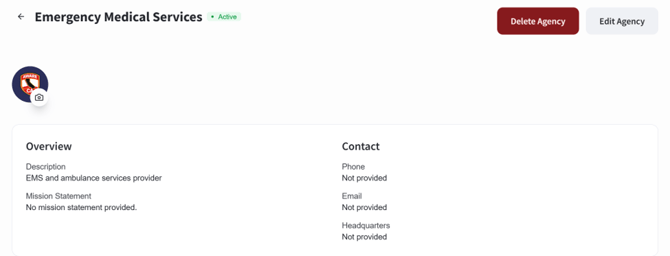
The Agency Information screen is accessed by selecting an already created agency from the Agencies screen.
The agency record displays information associated with the selected agency. Available details may include agency identity, status, contact information, location information, and other configured agency details. From this screen, users with the appropriate permissions can:
- Select Edit to update agency information
- Select Delete to delete the agency