
Calls for Service Screen
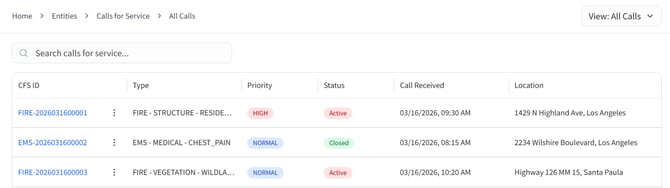
The Calls for Service (CFS) screen can be accessed by selecting Entities, then choosing Calls for Service. If available, Calls for Service may also be accessed directly from the sidebar.
Calls for Service are automatically ingested from your agency’s Computer-Aided Dispatch (CAD) system through system integration. These calls are not created or entered manually within Aware Intel Hub.
By default, the screen displays all Calls for Service. Users can apply filters located in the top-right corner of the screen to view Active or Closed Calls. These filtering results are determined by the source status assignments configured under Settings > Calls for Service Statuses. Calls with an unassigned source status appear when viewing all Calls for Service but do not appear in the Active or Closed filtered results.
The list displays key information for each call, including call ID, type, priority, status, date and time received, and location.
Selecting a CFS ID will open the detailed view for that specific call for service.
Call Details Screen
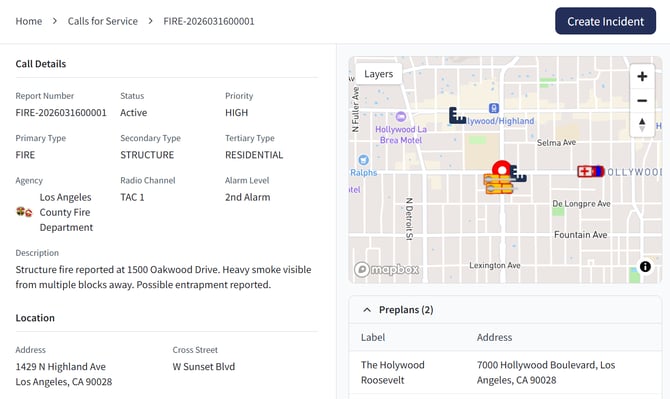
The Call Details screen is accessed by selecting a CFS ID from the Calls for Service screen.
All information displayed on this screen is sourced directly from your agency’s CAD system and is automatically populated through integration. This information is not intended to be manually entered or edited within Aware Intel Hub.
This screen provides a detailed view of all information associated with a specific call for service, including:
- Call identifiers such as call for service number and report number
- Status, priority, and call type
- Assigned agency and radio channel
- Call description and location
- Timeline information and caller details
Additional operational information is also available, including:
- A map displaying the location of the call
- Assigned resources
- A narrative log of call activity
Users can create a new incident from a call for service by selecting the Create Incident button located in the top right corner of the screen.