
The Publishers section is used to define users and groups with publishing rights. Users or groups that are authorized to publish content to Aware must have the Aware Publisher role.
The Publishers section displays the number of active publishers, including active users and groups. Select Manage to open the Manage Publishers screen.
Manage Publishers Screen
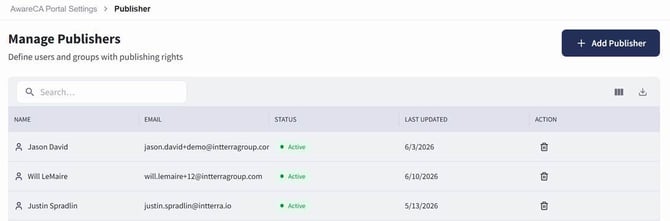
The Manage Publishers screen displays users and groups with publishing rights.
Adding a Publisher
Users with the appropriate permissions can add a publisher from the Manage Publishers screen.
To add a publisher:
- Open Aware Portal Settings.
- In the Publishers section, select Manage.
- Select + Add Publisher.
- In the Add Publisher window, select Users or Groups.
- Search by name or email.
- Select the user or group that should receive publishing rights.
- Select Add.
If the publisher should not be added, select Cancel.
Removing a Publisher
Users with the appropriate permissions can remove a publisher from the Manage Publishers screen.
To remove a publisher:
- Open Aware Portal Settings.
- In the Publishers section, select Manage.
- Locate the publisher in the table.
- Select the delete icon in the Action column.
- Confirm the removal when prompted.