
The Roles section is used to review access definitions and permissions within the Aware Intel Hub.
Roles define what users are allowed to access or perform in the system. A role is made up of assigned permissions, and those permissions determine what features, screens, actions, and records a user can access.
Roles should generally be assigned to groups rather than directly to individual users whenever possible. Assigning roles to groups creates a cleaner and more consistent permission structure. When access needs to change, administrators can update the group instead of managing permissions one user at a time. This makes long-term user management easier and helps reduce permission inconsistencies.
Individual role assignments can still be used when a specific user needs access that is not covered by a group.
Roles Screen
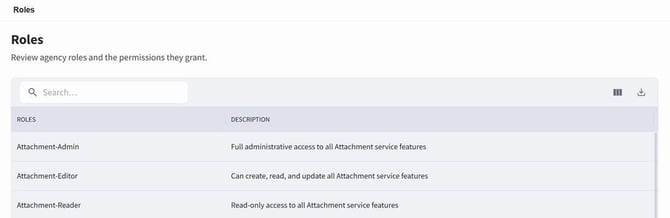
The Roles screen can be accessed by selecting Settings, then choosing Roles under Access Management.
The Roles screen displays available roles and their descriptions in a table.
Searching for Roles
To search for a role:
- Open the Roles section.
- Use the search bar on the Roles screen.
- Enter the role name or other available search information.
- Review the filtered results in the roles table.
- Select the role to review additional details.
Role Details Screen
Opening an existing role takes you to the Role Details Screen.
To open a role:
- Open the Roles section.
- Locate the role in the Roles table.
- Select the role name.
The Role Details Screen displays information associated with the selected role.
At the top of the Role Details Screen, the role description is displayed. If the role is a system default role, the screen also displays information explaining that the role is automatically available to all tenants, cannot be modified or deleted, and that the role and its permissions are consistently applied across all applicable tenants.
System Default Roles
A system default role is a role that is automatically available to all tenants.
System default roles cannot be modified or deleted. The role and its permissions are consistently applied across all applicable tenants.
System default roles are used to provide standard access definitions across the platform.
For Aware public-facing content workflows, two roles are particularly important. The Aware Publisher role provides publishing capabilities for Aware content, while the Aware Approver role provides approval capabilities for users or groups designated to approve Aware content. As with other roles, these roles can be assigned directly to individual users or through groups, with group-based role assignment preferred when possible.
Role Information and Assigned Permissions
The Role Details Screen includes a Role Information section and a permissions section.
The Role Information section displays basic information about the selected role.
The permissions section displays the permissions assigned to that role. These permissions define the access and actions granted to users or groups that receive the role.
Administrators should review assigned permissions carefully before assigning a role to a group or user. Roles determine what users can access and what actions they can perform within the platform.